Find profitable keywords + check your site's rankings in Google, Bing and Yahoo! If your business depends on Google, Yahoo! and Bing for traffic and sales, then your aim is to find profitable SEO keywords and keep your site ranking high for them in search engines. And that is exactly where Rank Tracker comes in handy, helping you: - Pick the most profitable keywords for your SEO campaign - Monitor accurate search engine rankings for your and your competitors' sites - Report on ranking progress to your clients or management Coping with these tasks manually is immensely time-consuming and, in fact, close to impossible. Luckily, Rank Tracker is here to automate, streamline, and accelerate all keyword research and rank checking tasks, saving hours of your valuable time every day. Who else wants to check rankings and generate profitable keywords like a pro? Just launch Rank Tracker, and in a matter of minutes you'll learn everything humanly possible about your keywords and rankings, including your site's position in any search engine, the exact URL found, how many times this or that keyword is being searched, how powerful a keyword is, and lots more! Automatically check your search engine rankings No more spending hours on manually checking your site's positions in search engines. Just sit back and let the rank checker do the boring job for you! Show if your site moved up or down in search results Every time you check your rankings, Rank Tracker will conveniently show you the ranking difference so you can easily see if your site has moved up slipped for whatever reason. Collect data from 325 different search engines Rank Tracker supports 325 international and local search engines so you can track your rankings using the ones that matters most to you. The currently supported SEs include Google, Yahoo! and Bing with their localized versions plus hundreds of others! Help you discover profitable keywords you've been missing out on! Check this out: Rank Tracker includes a powerful "Suggest Keywords" feature. With it, you'll be able to grab traffic-generating keywords using Google AdWords Keyword Planner, Google Suggest, your competitor's websites, and many other methods (Rank Tracker comes with a total of 17 different keyword suggestion tools — with many more on our TO-DO list!) Show you the BEST keywords to optimize your site for Rank Tracker can show you how many times a keyword has been actually searched by real people over the last month, plus how stiff the competition for this keyword is. This "number-of-searches-to-competition" ratio is known as Keyword Efficiency Index, or KEI. This is how professional search engine optimizers pick the best keywords to optimize for — they choose keywords with the biggest number of searches and the lowest competition. Go ahead, use the KEI feature to find out which keywords are worth it! So straightforward, a 12-year-old could use it. We realize your time is precious, and you'd rather spend it on more important things than struggling to figure out how a software program works. That's why we designed Rank Tracker to be as easy-to-use as possible, without compromising on any of its powerful features. Most features have a Wizard that will help you get the job done. Totally hands-free — with scheduled tasks run an autopilot Make a couple of simple settings adjustments once, and then the rank checker will do all tasks according to the schedule. The entire job is done without any interference on your part! All you do is look at the results on your computer screen. 100% search engine friendly. Along with the standard security feature Human Emulation, Rank Tracker supports Google, Yahoo! and Bing API keys for safe queries. Plus, it includes the Proxy Rotation feature that makes Rank Tracker the quickest and safest tool among modern SEO software. Really fast. It will check several hundred keywords within a couple of minutes, depending on the speed of your Internet connection. Lets you work with unlimited websites, pages and keywords. Unlike other SEO products, Rank Tracker lets you work with an unlimited number of domains or pages — so if you own several sites, you won't have to pay an extra cent for using Rank Tracker for all of them! Plus, Rank Tracker lets you continuously monitor an unlimited number of keywords. Manage your keywords by the thousand if you need to!
Freecharge, offering free cashback for all users now you can Get 6% Cashback On Recharge Of Rs.50 or Above. Bag this offer by following the steps below.
How to Get "Get 6% Cashback On Recharge Of Rs.50"
Visit Freecharge or Download app
Login or Register account
Enter recharge details
Make Recharge Rs.50 Or More
Apply Coupon Code - 6FC
Maximum Cashback Rs.50
Make Payment
*About Offer:
Valid on successful Recharges/Bill Payments done till 22nd April 2016
Valid on Min Recharge of Rs.50. Max Cashback of Rs.50 per transaction. Two times per user
6FC Promocode has to be applied to avail cashback offer
Valid only TWICE per User/Credit/Debit Card/Mobile Number
Valid on Credit/Debit card and FreeCharge Balance
Cashback will be credited to your FreeCharge Wallet which can be redeemed within 185 days from date of credit and is non transferable
Not Valid for Add Cash transactions and transactions done via Netbanking
Offer not valid on Virtual Cards and International Cards which are issued outside India
Offer not valid for Airtel transactions (Postpaid/Prepaid/DTH )
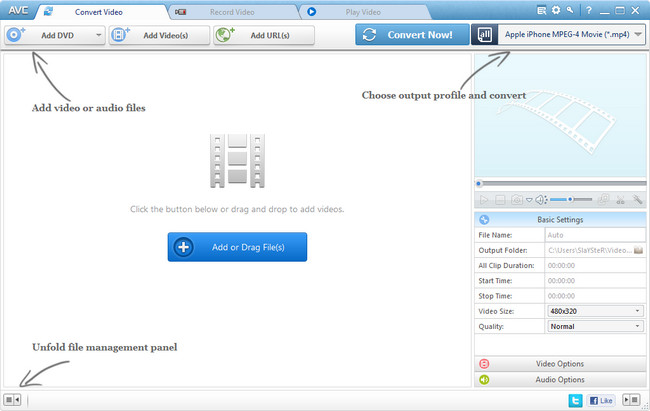
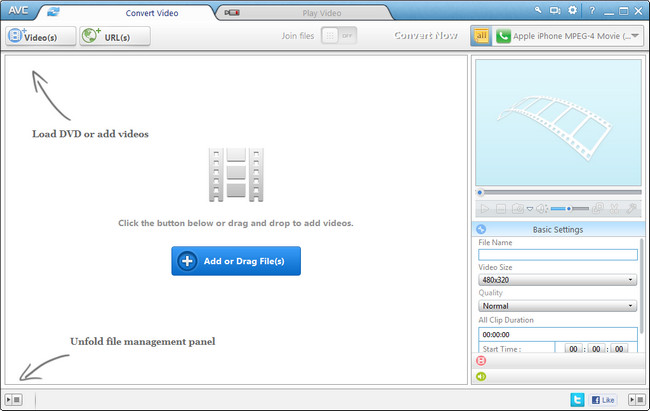
As Ultimate video converter, Any Video Converter performs its excellence in converting AVI, MPG, RMVB, MOV, MKV and many other video formats to WMV, AVI, MP4, FLV, 3GP and other popular formats at fast speed and with outstanding quality. Any Video Converter supports iPod, iPhone, Zune, PSP and other Portable Media Players (PMPs) and cell phones. Besides the output formats dedicated for iPod, iPhone, Zune, PSP and cell phones, Any Video Converter supports customizing WMV, AVI and 3GP formats.
Any Video Converter features include: * User-friendly interface that is easy to use. * Converts all video formats to Apple iPod Video, Sony PSP and more * Batch convert any video formats including avi, wmv, asf, mpg, mp4, etc. * Support DivX and Xvid avi format as importing and exporting video * Support default video/audio settings or user customized parameters for video and audio. * Has the option to preview the video in real-time before conversion . * World's fastest video conversion speed with stunning video and audio quality. * Supports adjust many video/audio options for MP4 files. For example, video/audio sample rate, bit rate, video size...
Whats New: Updates: official site does not provide any info about changes in this version
Go Keyboard-Emoji,Emoticons APK Latest version Free Download for all Smart-devices
Go keyboard-emoji,Emoticons APK is a very popular tool around in the world this famous tool is developed by (Go keyboard Dev team) which is a very useful and complete tools for your life input requirements now this amazing tool you can free download for providing link from bottom of this page now Go keyboard-emoji,Emoticons is great tool for android devices,tablets,iPad,i-pone and other smart-devices and this famous APK has many more much useful features which are as below
Features Of Go Keyboard-Emoji.Emoticons APK Latest Version
it can free and easily provide a lot of themes and layouts
you can easily to word corrections and world replacemen
if you wish to download this amazing tool on your devices from given link for without any cost.the Latest v2.63 of Go Keyboard-Emoji.Emoticons APK free Download here
As professional video converter, Any Video Converter performs its excellence in converting AVI, MPG, RMVB, MOV, MKV and many other video formats to WMV, AVI, MP4, FLV, 3GP and other popular formats at fast speed and with outstanding quality. Any Video Converter supports iPod, iPhone, Zune, PSP and other Portable Media Players (PMPs) and cell phones. Besides the output formats dedicated for iPod, iPhone, Zune, PSP and cell phones, Any Video Converter supports customizing WMV, AVI and 3GP formats.
Any Video Converter features include: • User-friendly interface that is easy to use. • Converts all video formats to Apple iPod Video, Sony PSP and more • Batch convert any video formats including avi, wmv, asf, mpg, mp4, etc. • Support DivX and Xvid avi format as importing and exporting video • Support default video/audio settings or user customized parameters for video and audio. • Has the option to preview the video in real-time before conversion . • World's fastest video conversion speed with stunning video and audio quality. • Supports adjust many video/audio options for MP4 files. For example, video/audio sample rate, bit rate, video size...
Any Video Converter Pro is a professional video converter which can convert video files from various formats with fast converting speed and excellent video quality . It can convert almost all video formats including DivX, XviD, MOV, rm, rmvb, MPEG, VOB, WMV, AVI to MPEG-4, AVI, WMV, 3GP, 3G2 format for your iPod, PSP, iPhone, Archos, Creative Zen, iRiver and many other portable media players. It also supports any user defined video file formats as the output. It has an unmatchable speed and high quality. Any Video Converter Pro. makes it easy for anyone to enjoy videos in any formats video on the go.
Any Video Converter Pro is a YouTube Video Converter which can download video from YouTube.com and convert YouTube videos to other formats. With the "downloading + converting" one-step solution, Any Video Converter Pro. easily downloads and converts YouTube videos to play on your iPod, iPhone, PSP, Zune, 3GP mobile phone, Apple TV, etc. Besides, you can specify YouTube video quality to download, types of video quality could be standard FLV movies, 3GP mobile phones, high quality AVC MPEG-4 movies and high definition (HD) MP4 videos.
Any Video Converter Pro is also a HD video converter which allows you to convert HD movies including HD AVI, HD MKV, HD WMV, AVCHD, TS, TP, MKV to videos playable on iPod, PSP and other devices. High definition output video size up to 1920x1080 are also available for MKV, AVI, WMV and MP4 output formats.
Any Video Converter provides an audio extraction feature as a bonus. You can extract audio from any video formats it supports to MP3, AAC, M4A, WMA, OGG and Wave.
Root android without pc & how to root android phone without pc is the most trending question on internet. We have shared the top 7 root without pc application to successfully root android without pc. Our visitors daily ask us, email us regarding how to root android phone without pc. So here on the special demand of nduprincekc visitors, we are sharing all new working methods to root android without pc with root without pc apk 2016. Most of us have heard about the Android rooting smartphones. Even if the answer is negative or positive, it won’t matter, because by the time you finish reading this article, you would get well versed with android rooting and the methods to root android without pc. Developers employ various tricks from their sleeve to root without pc or computer.
But before you get to know on how to root android phone without pc or computer, you have to know what android rooting is and how much effective it can be.
Root android without pc
What is Android Rooting?
Android is an OS (i.e. open source OS) where you won’t be having full or complete root access to perform various functions on your smartphone. Rooting is a procedure where one can cross over the limitations and get full access to the OS. Now this rooting would help one to get access to the root of the OS and even provide the basic ability to create global changes. There are various methods available to root your android devices easily. But here we have share some of the best new working methods to root android without pc. Our tricks to root without pc is absolutely working for most of the device. We have also shared some of the best root without pc apk in this article. Do read the all the instruction carefully before rooting your android device without pc or computer.
Advantages of Android Rooting:
One of the biggest advantages of root android without pc is having free and abundant internal memory. Yes! Individuals often struggle with low internal memory, but by rooting their phone, they can transfer any apps from the internal memory to the SD card.
In addition, you would be able to use the latest and current Android operating system. Simply by rooting android without pc, it would provide you with the option to set up any future and current operating system by just installing the custom and tailor-made ROM.
The most powerful and attractive benefit to root without pc is the ability to customize ROM. There are thousands of custom and qualitative ROM which can help in doing various things right from speeding up the processing ability of your smartphone to modifying the entire options, looks and feel of the phone. Isn’t that great?
Another interesting advantage of how to root android phone without pc is that you can run various special apps. You could easily install variety of apps which are compatible along with the rooted smartphones. For example, you could easily uninstall various apps after you have root accessed by simply using the uninstall option.
Disadvantage of Android Rooting:
One of the biggest disadvantages of to root android without pc is that you could end up voiding the warranty of the phone. That is why some people avoid it. To root means getting your phone bricked. This is the most common disadvantage of using the rooting procedure.
No matter how much expert or best you are in using the best tutorial in rooting, there is no doubt that it is simply just a daunting task. So, in case if you pass out any step or flash the corrupt zip file, then you could end up with a broken or bricked smartphone.
How To Root Android Phone Without PC Or Computer? (7 Easy Methods)
Method 1:Employing Framaroot To Root Android Without PC
A framaroot is a normal one click app which can root all kinds of android devices or phones and that too without the use of computers. This particular app was basically developed by Alephzain who was from the XDA forums. With just a single click of this particular app, one could install SU binary and Superuser easily on the smartphone and you will get your answer of how to root android without pc.
Framaroot a root without pc apk currently supports smartphones who have Android version 2.0+. This is the fastest and easiest method to root without PC. All you have to do is just simply download the Framaroot app and then copy the downloaded file into the smartphone or device through the SD.
STEP 1: First step would be to download the particular Framaroot app to your PC or smartphone: Download Framaroot Application (Updated**)
STEP 2:Now in case you have downloaded the file to your computer, then you need to copy the APK file into the smartphone memory. In case if you have downloaded into the phone, make sure to move it to a specific folder.
STEP 3:Once that is done, then you need to install the Framaroot from the given apk file.
STEP 4: Here you need to select the ‘Install Superuser’ option which is present in the Framaroot.
Framaroot Root Android Without Computer
STEP 5: Then you can select any of the given exploits which would appear in the applications.
STEP 6: Now you may have to wait and in case you see this message “Success, SU binary and Superuser installed”, it means that your rooted app is successfully installed and you would have to reboot the system in order to use it. Finally you are done with the process of root android without pc methods.
How to root android without pc
But if you get a failed message, then there is another exploit method to root android without computer.
Method 2: Using Universal Androot to Root Without PC
There are various ways for how to root android without computer but the regular methods can be quite complicated. Androot is simple app that could easily help in rooting the Android phone with the simple downloading and installing without the use of the PC. It is so far an easy and working methods to root android without pc.
STEP 1: First go to the Settings option of your Android Device and selects the Application option. Here you need to click the check box for Unknown source and save it.
STEP 3: Once it is success, then you need to launch the app into your cell phone and click on the Root option. You must make sure that you select the right version of the Android cell phone.
Universal Androot to Root Without PC
STEP 4: Your Android phone is now successfully Rooted. Share this best root without pc apk with your friends to answer them on how to root android without pc.
Method 3: iRoot
This is one of the easiest method to root android without pc or computer. This software is developed by Mgyun team who had also realesded vRoot before. This iRoot application support any android mobile or smartphone. It supports Android 2.2 to 4.4 running devices to root it without the use of computer.
iroot application
It supports more than 150000 models with various brand names. iRoot uses the most advanced rooting technique which give 95% success rate. You can just root or unroot your android device in just one single click.
Method 4: Z4 Root To Root Andriod Without PC
This is one of the best and the oldest app to root android mobile without the use computer or pc. It is very easy to use this application. This application is developed by one the member of XDA. This Z4 Root application can root almost every android mobile chipset. If you have the android mobile from the company xolo, lava, micromax, spice then you must try this root android without pc application.
Method 5: Easy Rooting Toolkit App
This is one of the best and new working app to root android phone without pc. This easy rooting toolkit will root your mobile and even install the busybox and su files in your mobile. You must have try this app to easily root your android device.
Method 6: Towel Root
This application is developed by Geohot to root without pc easily. It successfully rooted Verizon Galaxy S5, AT&T GS5, Nexus 5, GS4, Note 3 and lots of Latest Android mobile devices. It is very easy and free to download from our website.
If you have any doubts in using this towel root application to root android mobile then comment here. We will try to solve it as soon as possible.
Method 7: CF Auto root
This is the new android app to root android without pc. This app is developed by chainfire. It can easily root your samsung mobile and other mobile as well. Download the CF Auto Root as per your mobile device. There so many downloads are available here. You just have to pick up the one as per your mobile device. Visit here to get all the list of CF Auto Root.
How to check whether your Android phone is rooted or not?
After using our root without pc apk to root android without pc you need to check whether it is successfully rooted or not. For that you have to follow below given steps:
5. Compatibility For Omap36XX Devices (Gimli exploit only):
No.
Omap36XX Devices
1
Archos Gen8
2
Cliq 2 MB611
3
Coolpad Quattro 4G
4
Droid 2 (a955)
5
Droid 2 Global (a956)
6
Droid X (MB810)
7
LG Marquee LS855
8
LG P970 Optimus Black
9
Motorola DEFY+ (MB525 / MB526)
10
Motorola Droid PRO
11
Motorola Droid X
12
Motorola XPRT
13
Parrot ASTEROID Smart
14
R2D2 (a957)
Above given all methods for how to root android phone without pc is very easy to understand and implement. We have tried our best to understand you to root android without pc. The all above given methods are tested by our technical team and its 100% working for most of the device. We are also suggesting you to try once this methods to root without pc. Also comment here to get all know that whether this root without pc methods works for your or not.
If you like our post on how to root android phone without pc then you can even share it with your friends and family members. You can choose your favorite social media button to share this awesome working methods to root android without pc. Bookmark this page to get latest updates on root android without pc.
If You Like This Please Leave a Comment Or Share this Post